 |
| C++ Programming |
The C++ Language
If you visit http://www.stroustrup.com/C++.html, you will come across a plethora of information about the C++ programming language, direct from the designer of the language, Bjarne Stroustrup. Bjarne lists a definition of C++ as:
"... a general purpose programming language with a bias towards systems programming that
- is a better C
- supports data abstraction
- supports object oriented programming
- supports generic programming"
The language started in 1979 and was originally known as C with Classes. Essentially it meant that class files (used in object-oriented programming), were added to the C language. In 1983 it was renamed to C++.
C++ exists under the stewardship of a standards committee and became an ISO standard in 1998 with a revision in 2011 and a minor revision in 2014. It continues to be updated as a part of the standards committee work.
C++ History
The C++ programming language has a history going back to 1979, when Bjarne Stroustrup was doing work for his Ph.D. thesis. One of the languages Stroustrup had the opportunity to work with was a language called Simula, which as the name implies is a language primarily designed for simulations. The Simula 67 language - which was the variant that Stroustrup worked with - is regarded as the first language to support the object-oriented programming paradigm. Stroustrup found that this paradigm was very useful for software development, however the Simula language was far too slow for practical use.
Shortly thereafter, he began work on "C with Classes", which as the name implies was meant to be a superset of the C language. His goal was to add object-oriented programming into the C language, which was and still is a language well-respected for its portability without sacrificing speed or low-level functionality. His language included classes, basic inheritance, inlining, default function arguments, and strong type checking in addition to all the features of the C language.
The first C with Classes compiler was called Cfront, which was derived from a C compiler called CPre. It was a program designed to translate C with Classes code to ordinary C. A rather interesting point worth noting is that Cfront was written mostly in C with Classes, making it a self-hosting compiler (a compiler that can compile itself). Cfront would later be abandoned in 1993 after it became difficult to integrate new features into it, namely C++ exceptions. Nonetheless, Cfront made a huge impact on the implementations of future compilers and on the Unix operating system.
In 1983, the name of the language was changed from C with Classes to C++. The ++ operator in the C language is an operator for incrementing a variable, which gives some insight into how Stroustrup regarded the language. Many new features were added around this time, the most notable of which are virtual functions, function overloading, references with the & symbol, the const keyword, and single-line comments using two forward slashes (which is a feature taken from the language BCPL).
In 1985, Stroustrup's reference to the language entitled The C++ Programming Language was published. That same year, C++ was implemented as a commercial product. The language was not officially standardized yet, making the book a very important reference. The language was updated again in 1989 to include protected and static members, as well as inheritance from several classes.
In 1990, The Annotated C++ Reference Manual was released. The same year, Borland's Turbo C++ compiler would be released as a commercial product. Turbo C++ added a plethora of additional libraries which would have a considerable impact on C++'s development. Although Turbo C++'s last stable release was in 2006, the compiler is still widely used.
In 1998, the C++ standards committee published the first international standard for C++ ISO/IEC 14882:1998, which would be informally known as C++98. The Annotated C++ Reference Manual was said to be a large influence in the development of the standard. The Standard Template Library, which began its conceptual development in 1979, was also included. In 2003, the committee responded to multiple problems that were reported with their 1998 standard, and revised it accordingly. The changed language was dubbed C++03.
In 2005, the C++ standards committee released a technical report (dubbed TR1) detailing various features they were planning to add to the latest C++ standard. The new standard was informally dubbed C++0x as it was expected to be released sometime before the end of the first decade. Ironically, however, the new standard would not be released until mid-2011. Several technical reports were released up until then, and some compilers began adding experimental support for the new features.
In mid-2011, the new C++ standard (dubbed C++11) was finished. The Boost library project made a considerable impact on the new standard, and some of the new modules were derived directly from the corresponding Boost libraries. Some of the new features included regular expression support (details on regular expressions may be found here), a comprehensive randomization library, a new C++ time library, atomics support, a standard threading library (which up until 2011 both C and C++ were lacking), a new for loop syntax providing functionality similar to foreach loops in certain other languages, the auto keyword, new container classes, better support for unions and array-initialization lists, and variadic templates.
Shortly thereafter, he began work on "C with Classes", which as the name implies was meant to be a superset of the C language. His goal was to add object-oriented programming into the C language, which was and still is a language well-respected for its portability without sacrificing speed or low-level functionality. His language included classes, basic inheritance, inlining, default function arguments, and strong type checking in addition to all the features of the C language.
The first C with Classes compiler was called Cfront, which was derived from a C compiler called CPre. It was a program designed to translate C with Classes code to ordinary C. A rather interesting point worth noting is that Cfront was written mostly in C with Classes, making it a self-hosting compiler (a compiler that can compile itself). Cfront would later be abandoned in 1993 after it became difficult to integrate new features into it, namely C++ exceptions. Nonetheless, Cfront made a huge impact on the implementations of future compilers and on the Unix operating system.
In 1983, the name of the language was changed from C with Classes to C++. The ++ operator in the C language is an operator for incrementing a variable, which gives some insight into how Stroustrup regarded the language. Many new features were added around this time, the most notable of which are virtual functions, function overloading, references with the & symbol, the const keyword, and single-line comments using two forward slashes (which is a feature taken from the language BCPL).
In 1985, Stroustrup's reference to the language entitled The C++ Programming Language was published. That same year, C++ was implemented as a commercial product. The language was not officially standardized yet, making the book a very important reference. The language was updated again in 1989 to include protected and static members, as well as inheritance from several classes.
In 1990, The Annotated C++ Reference Manual was released. The same year, Borland's Turbo C++ compiler would be released as a commercial product. Turbo C++ added a plethora of additional libraries which would have a considerable impact on C++'s development. Although Turbo C++'s last stable release was in 2006, the compiler is still widely used.
In 1998, the C++ standards committee published the first international standard for C++ ISO/IEC 14882:1998, which would be informally known as C++98. The Annotated C++ Reference Manual was said to be a large influence in the development of the standard. The Standard Template Library, which began its conceptual development in 1979, was also included. In 2003, the committee responded to multiple problems that were reported with their 1998 standard, and revised it accordingly. The changed language was dubbed C++03.
In 2005, the C++ standards committee released a technical report (dubbed TR1) detailing various features they were planning to add to the latest C++ standard. The new standard was informally dubbed C++0x as it was expected to be released sometime before the end of the first decade. Ironically, however, the new standard would not be released until mid-2011. Several technical reports were released up until then, and some compilers began adding experimental support for the new features.
In mid-2011, the new C++ standard (dubbed C++11) was finished. The Boost library project made a considerable impact on the new standard, and some of the new modules were derived directly from the corresponding Boost libraries. Some of the new features included regular expression support (details on regular expressions may be found here), a comprehensive randomization library, a new C++ time library, atomics support, a standard threading library (which up until 2011 both C and C++ were lacking), a new for loop syntax providing functionality similar to foreach loops in certain other languages, the auto keyword, new container classes, better support for unions and array-initialization lists, and variadic templates.
C++ Program Structure
A C++ program has a very specific structure in terms of how the code is written and some key elements that you use in your C++ programs. The simplest of C++ programs is shown here.
1. #include <iostream>
2.
3. int main()
4. {
5. std::cout << "Hello World!";6. return 0;
7. }
In this simple program we notice some elements listed. The line numbers are used for reference only and are not part of the program code.
2.
3. int main()
4. {
5. std::cout << "Hello World!";6. return 0;
7. }
In this simple program we notice some elements listed. The line numbers are used for reference only and are not part of the program code.
Line 1: this is known as a pre-processor directive. it instructs the compiler to locate the file that contains code for a library known as iostream. This library contains code that allows for input and output to streams, such as the console window.
Line 3: Every C++ program must have a method known as main(). It is referred to as the entry point for the application when you start execution of the program on your computer. The int portion is the return type of the method. The empty parentheses () after the method name indicate that this a method and that it takes no arguments, in other words, there are no parameters for passing in values.
Line 4: Method bodies in C++ start with an open curly brace.
Line 5: This code uses a method known as cout (pronounced "see out") to send the text Hello World! to the console for output and display. The std:: prefix to this command is a way of indicating that cout is part of a namespace known as std. The :: is is used to indicate that cout is part of the std namespace.
Also notice that the line ends with a semi-colon. C++ statements are terminated with semi-colons.
Line 6: The return statement is used to end a function or method when a value is expected to be sent back to a caller. In this case, the caller is the operating system and the value returned is an integer value of 0. If the program reaches this statement, returning a value of 0 is an indication to the operating system that the code executed successfully. In the past, programmers would return 0 to indicate successful execution and non-zero values to indicate that an error had occurred in the program somewhere.
Line 7: This line closes out the body of the function main() and is necessary so the compiler knows where the function or method ends, but is also used for other purposes that will be covered later in the course on variable scope and visibility.
C++ Apps on Different Platform
Writing code in multiple languages as a way to have your applications execute on multiple platforms or different operating systems can take a considerable amount of time resulting in duplication of effort. Application portability may not be a requirement for all software applications but what if portability is required? So, what exactly is portability or the ability to execute on multiple platforms?
Primarily, portability refers to the process of compiling your code, without major changes, across different compilers or different platforms. Platforms typically mean computer hardware, operating systems, CPU architectures, or device form factors. Compilers refer to the process of turning your code into executable form. Each platform or operating system may have different compilers available from different providers such as Microsoft, Intel, or Oracle.
Compilation Process
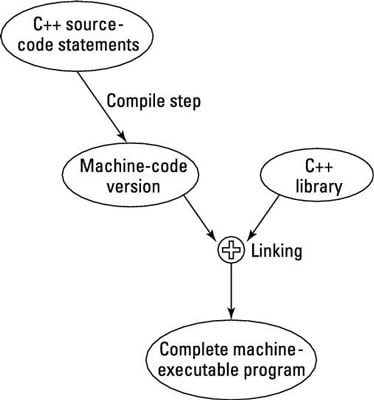
- The editor can invoke the compiler quickly without making you switch back and forth manually.
- The editors in most IDEs provide quick and efficient means for finding and fixing coding errors.
- Some IDEs include visual programming tools that allow the programmer to draw common windows such as dialog boxes on the display.
- The IDE generates the C++ code necessary to display onscreen boxes automatically.
The Role of the Linker
Once the compiler has completed its tasks, the linker is then invoked. The linker is responsible for taking all the object files, that will be part of the application's executable code, and then links them all together in the application .exe file. At the same time, the linker ensures that all promises of the compiler are kept, during the linking process.
A an example, if your program makes use of the cout function, that is found in the iostream set of files, the linker will ensure that the necessary code for that function, is included in your .exe file.
Code Formatting
C++ is a case sensitive language. Case sensitivity means that your keywords and variable declarations must match the case. For example, a C++ keyword for a constant type is const. If you were to type Const or CONST, the compiler would not know that your intention was to use the keyword const.
Aside from the case sensitivity, C++ also has a defined outline for program code and specific "elements" found in a typical C++ application. These elements consist of:
- Preprocessor directives which are used to have the compiler execute tasks prior to compiling the source code
- using directives which are utilized to indicate which namespaces to include in a source code file
- a function header which consists of a return type, function name, and parameters
- a function body containing the code that performs the actions required of that function
- statements that are contained in the C++ source code file
- comments for documenting the source code for programmers to understand what the code is intended to do
- a return statement that sends data back to the function caller
- curly braces to enclose bodies of statements. Commonly used to denote the body of a function or a flow controls statement such as a for loop
C++ source code also permits judicious use of white space (tabs, spaces, new lines) to create code that is easier to read. The compiler completely ignores the white space, with a small exception concerning if statements that will be covered later. It is highly recommended that you make use of white space to indent and separate lines of code to aid in readability of your source code files.
NOTE: Unlike Python, indenting lines after the for statement does not tell the compiler to execute those indented lines as part of the for statement. In C++, multiple statements for a single for statement, must be enclosed in curly braces. This will be covered more in Module 3, Control Statements.
C++ Statements
A C++ program is comprised of various components such as functions, methods, classes, etc. The instructions that form part of a C++ program typically reside inside of functions or methods. These functions are comprised of C++ statements. You will find yourself using various types of statements in your C++ code as listed here:
- declarations - these are used to declare variables and constants that will be used in your application
- assignments - these are used to assign values to variables in your application code
- preprocessor directives - covered in the topic on Code Formatting
- comments - used to document your code
- function declarations - covered in the topic on Code Formatting
- executable statements - these are used to perform operations and execute instructions. Examples would be cout << "Hello World!"; which outputs Hello World! to the console.
You will use these statement types throughout this and successive courses on C++.
Comments
Post a Comment